
You found a job that fits, uploaded your CV, clicked Apply, and heard nothing back. One common reason is that your resume never reached a person in a form they could use. Before most recruiters see an application, it passes through an applicant tracking system (ATS), the software employers use to collect, organise and search candidates.
This guide explains what an ATS does with your resume, which formats and file types are safest, how to use keywords honestly, and how to tailor your CV for each job. It includes before-and-after examples and a checklist to run before every application.
- An ATS-friendly resume does two jobs: the software has to read it correctly, and it has to show a recruiter that you match the role.
- Use a simple single-column layout, standard headings, real text (not images) and a common font. Keep contact details in the body of the page, not in the header or footer.
- Use a text-based PDF or a DOCX, and always follow the file type the application asks for.
- Most rejections come from people and screening questions, not from a robot reading your formatting. A messy parse can still make you hard to find and hard to read.
- Use the employer’s language for skills you really have. Tailor your summary, skills and top bullet points for each application, and never claim experience you don’t have.
What is an ATS (applicant tracking system)?
An applicant tracking system is recruitment software that manages the hiring process from job posting to offer. When you apply through a company careers page or a large job portal, the ATS usually:
- stores your application and the documents you upload
- parses your resume, extracting your name, contact details, job titles, employers, dates, education and skills into a structured candidate profile
- records your answers to screening questions, such as work authorisation, notice period or required licences
- lets recruiters search, filter, tag and move candidates through stages such as screening, interview and offer
- keeps your profile on file, so recruiters can find you for future roles
Widely used platforms include Workday, SAP SuccessFactors, Oracle (Taleo and Oracle Recruiting), iCIMS, Greenhouse, Lever, SmartRecruiters, Bullhorn (popular with recruitment agencies) and BambooHR. Each one parses and ranks applications a little differently, which is why no single “ATS template” is guaranteed to work everywhere.
They’re the same thing here. In the UAE, the wider GCC, the UK and much of Europe and Asia, “CV” is the everyday word for the document you send with a job application. In the US and Canada, that document is called a “resume”. An “ATS CV” and an “ATS-friendly resume” mean the same thing: a job application document that software can read accurately. (In academia and medicine, a “CV” can also mean a longer, full career record.)
Do companies actually use ATS?
Yes, especially larger employers. Jobscan’s 2026 analysis of Fortune 500 companies found an ATS at 97.4% of them (487 of 500). Workday alone accounted for more than 40%, and SAP SuccessFactors for about 12%.
You don’t need the statistic to know when you’re dealing with one. If an employer’s careers page asked you to create an account, upload a CV, check auto-filled fields and answer screening questions, you were using an ATS. Plenty of mid-sized employers and recruitment agencies work the same way. Small businesses may still hire by email, but even then your CV may be added to a system later.
The practical takeaway: assume every CV you send will be read by software first and by a person second, and write it to work for both.
What happens after you submit your resume
Every employer configures its system differently, and not every step below happens in every ATS. It helps to keep six different things apart, because each one affects your application in a different way:
- ApplyYou upload a CV and complete the online form.
- ParseThe ATS converts your file into text and fills in profile fields.
- Knockout questionsYes/no answers on must-haves such as work authorisation or a licence.
- Search & filtersRecruiters search by keywords or filter by fields such as location.
- Ranking (some systems)Some platforms sort applicants with a match score or AI ranking.
- Human reviewA recruiter reads the profile or CV and decides who moves forward.
1. Resume parsing: can the software read you?
The parser tries to work out which text is a job title, an employer, a date or a skill. Clean, predictable layouts parse well. Text boxes, multiple columns, tables, icons used instead of words, and contact details in the header or footer can be scrambled or lost, depending on the parser. Parsing doesn’t judge you. But if your job title lands in the “employer” field or your phone number disappears, the profile a recruiter sees is weaker than your actual CV.
2. Knockout questions: the most common automatic rejection
Many applications include yes/no questions such as “Do you hold a valid UAE driving licence?”, “Are you legally eligible to work in Canada?” or “Do you hold an active DHA licence?” An employer can set a particular answer to reject the application automatically, whatever your CV says. Read each question carefully and answer it truthfully.
3. Keyword search and recruiter filters: can a recruiter find you?
Recruiters often search the ATS database, for example “quantity surveyor” AND “CostX”, or narrow a list by location, years of experience or a required certification. These are choices a recruiter makes, not something the software decides alone. If your CV doesn’t use the terms that describe your real experience, you may not appear in the results even when you’re qualified. You aren’t “rejected by a robot”, but you can be invisible. That’s why keywords matter.
4. Automated ranking: only in some systems
Some platforms give each applicant a match score or AI-based ranking, comparing the parsed profile with the job requirements. Many employers don’t use this, and where they do, it’s usually a way to decide which applications to look at first rather than a final decision. The exact method isn’t published, and it differs between vendors, so no outside tool can tell you your “real” score.
5. Human review: can you convince a person?
Eventually a recruiter opens your profile or original CV, and ordinary resume quality takes over: a clear target job title, a relevant summary, achievements with numbers, and a layout that’s easy to skim. An ATS-friendly resume is still a resume written for people. If you’re building yours from scratch, start with our guide on how to write a professional resume.
ATS myths vs reality
Much ATS advice online is out of date or exaggerated. Here is what holds up:
| Myth | Reality |
|---|---|
| “75% of resumes are rejected by ATS before a human sees them.” | This widely repeated figure has no reliable published research behind it. In a 2025 interview study of 25 US recruiters by Enhancv, 23 of 25 said their ATS does not automatically reject resumes for formatting, content or design. It’s a small sample, but it matches how most systems are set up. |
| “ATS automatically rejects you.” | Only when an employer sets it up to: usually through knockout questions, and occasionally through content rules such as a minimum match score (2 of the 25 recruiters in the Enhancv study used these). Most unanswered applications come down to volume, fit or a recruiter’s decision. |
| “ATS can’t read PDFs.” | Modern systems generally read text-based PDFs well. Problems come from scanned PDFs, PDFs saved as images and heavily designed layouts. |
| “Your resume needs an ATS score of 80%+.” | Many ATS platforms don’t score candidates at all. Scores you see online come from third-party checkers, each with its own formula, and they don’t predict how a particular employer’s system will rank you. |
| “Hide keywords in white text to beat the system.” | The hidden text appears in the parsed profile a recruiter reads, and it looks dishonest. Don’t do it. |
| “Formatting doesn’t matter if ATS doesn’t reject you.” | A bad parse can still put your job titles in the wrong fields, lose your phone number or make you harder to find in searches. Readability still matters. |
| “There’s one perfect ATS template.” | Any clean, single-column, text-based layout works. A tailored CV with relevant content beats a “perfect” template with generic content. |
Employers can set filters that screen people out. Harvard Business School’s Hidden Workers research found that rigid automated criteria, such as filtering for employment gaps or exact credentials, can exclude capable candidates. You can’t control an employer’s settings, but you can answer screening questions accurately, use the employer’s terms for skills you really have, and briefly explain a career gap (for example “Career break: family relocation, 2024”) rather than leaving it unexplained.
The safest ATS resume format
For most candidates, the safest choice is a reverse-chronological resume: your most recent job first, with clear dates. Parsers and recruiters both expect it. If you’re changing careers or have gaps, a hybrid format works well: a short skills-focused summary and core skills section, followed by a normal chronological work history. Avoid purely “functional” resumes that list skills without saying where and when you used them. Recruiters find them hard to trust, and parsers find them hard to map. Not sure which structure fits your situation? Our resume format comparison shows chronological, functional and combination resumes side by side, with full examples.
Recommended structure
How long should it be? One page suits graduates and early-career applicants. Two pages is normal for most experienced professionals, including in the GCC. Three pages can work for senior, technical or project-heavy roles if every line earns its place. The ATS doesn’t care about length, but the recruiter does.
Which file format should you use? PDF vs DOCX
Start with this rule: if the application or job ad names a file type, use that one. If it doesn’t:
Keeps your layout exactly as you designed it, and is widely accepted by modern ATS platforms.
Use it when: it’s exported directly from Word, Google Docs or a similar editor (File → Save as / Download → PDF), and you can highlight and copy the text.
The most universally parseable format, and easy for recruitment agencies to edit or reformat.
Use it when: the portal asks for Word, you’re applying through an agency, or you’re unsure how old the employer’s system is.
Avoid: scanned CVs, photos of a CV, PDFs exported as images from design apps, .pages files, and password-protected or “print-to-image” PDFs. Quick test: open your PDF, press Ctrl/Cmd + A, then copy and paste into a plain text editor. If the text comes out in the right order with nothing missing, a parser can read it too.
Name your file professionally: FirstName-LastName-Job-Title-CV.pdf, for example Sara-Ali-HR-Manager-CV.pdf. Not CV_final_v7_NEW.pdf.
ATS formatting rules: fonts, tables, columns, icons, photos and graphics
Every formatting decision comes down to one question: will this element turn into clean, correctly ordered text?
| Element | ATS risk | What to do |
|---|---|---|
| Fonts | Low | Use a standard font such as Arial, Calibri, Aptos, Helvetica, Verdana, Georgia, Cambria or Times New Roman. Body text 10.5–12 pt, headings 13–16 pt. Avoid decorative or script fonts. |
| Multiple columns | Medium–High | Some parsers read straight across both columns and mix up the text. Use a single column for anything important. A simple two-column skills list inside a single-column CV is usually fine. |
| Tables | Medium | Newer systems handle simple tables, but older ones can scramble the reading order. Don’t put your work history or contact details in a table. |
| Text boxes and shapes | High | Content in text boxes is often skipped entirely. Don’t use them. |
| Header and footer | Medium–High | Some parsers ignore them. Put your name and contact details in the main body. Page numbers in the footer are fine. |
| Icons | Medium | A phone or envelope icon carries no text. Write “Phone:” and “Email:” or just give the details. Never use icons in place of words. |
| Skill bars, star ratings and charts | High | The software sees nothing, and a recruiter can’t tell what “4/5 Excel” means. Write the skill and evidence instead: “Excel (pivot tables, XLOOKUP, Power Query)”. |
| Photo | Low (it’s ignored) | The ATS won’t read it. In the UAE and parts of the GCC, a professional photo is still common and sometimes requested. In the US, UK and Canada, leave it out. If you include one, keep it small and don’t place text beside it. |
| Logos and graphics | High | Employer logos and infographics add nothing a parser can read. Use the company name as text. |
| Bullets | Low | Use standard round or square bullets. Avoid unusual symbols and emoji. |
| Hyperlinks | Low | Write the full URL as text (linkedin.com/in/yourname), since some systems drop the link and keep only the visible words. |
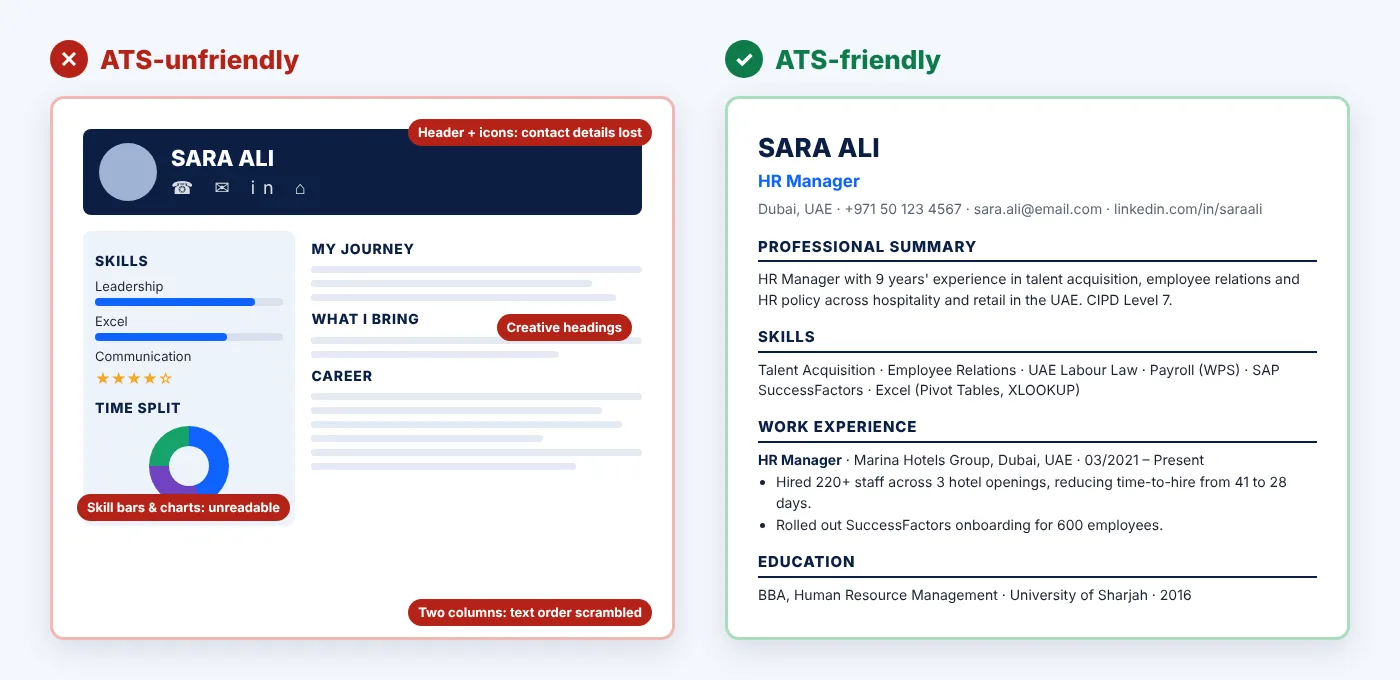
Bad vs better ATS formatting: contact block
☎ | ✉ | in
[Photo] [Two-column table: Contact | Profile]
The name and icons sit in a header or text box. Contact details may be lost, and the table can mix up the reading order.
HR Manager
Dubai, UAE · +971 50 123 4567 · sara.ali@email.com · linkedin.com/in/saraali
Plain text in the main body, in reading order, with the country code included.
Use standard section headings
Parsers look for familiar labels. Creative headings like “My Journey” or “What I Bring” may not be recognised. Use:
- Professional Summary (or Summary, or Profile)
- Skills (or Core Skills, or Key Skills)
- Work Experience (or Experience, or Professional Experience)
- Education
- Certifications / Licences
- Languages, Projects, Volunteering (if relevant)
How to write each section of an ATS-friendly resume (with examples)
Name, target job title and contact details
Put a target job title directly under your name, and make it match the role you’re applying for as closely as your experience honestly allows. Recruiters often search by title, so if the vacancy is “Procurement Specialist”, a headline that says “Supply Chain Enthusiast” helps no one. Then include:
- City and country (a full street address isn’t needed)
- Phone number with country code
- A professional email address
- Your LinkedIn URL, plus a portfolio or GitHub link if relevant
- For GCC applications, where useful: visa status, availability or notice period, and driving licence (for example “UAE Driving Licence · Available: 30 days”)
Professional summary: generic vs targeted
No job title, no field, no evidence. It could describe anyone, and it contains no searchable terms.
Job title, years of experience, sector, region, the role’s core skills and a credential, all in four lines.
Work experience: structure the ATS expects
Use the same pattern for every role. Consistency helps both the parser and the recruiter:
Al Noor Contracting LLC, Dubai, UAE
03/2021 – Present
• Achievement bullet
• Achievement bullet
- Dates: pick one format (MM/YYYY or “Mar 2021”) and use it everywhere. Write “Present” for your current role. A year on its own can make your experience look shorter than it is.
- Job titles: use your real title. If it’s unusual, add a recognised equivalent in brackets, for example “Talent Partner (Recruiter)”.
- Bullets: 3–6 per recent role, fewer for older roles. Start with a strong verb and show scope, action and result.
Before and after: experience bullets
More examples from different fields:
| Weak bullet | Stronger bullet |
|---|---|
| Handled customer complaints. | Resolved 40+ guest escalations per month at a 320-key hotel front office, lifting the property’s review score from 8.4 to 8.9 in 12 months. |
| Did sales in my territory. | Grew B2B territory revenue by 22% year on year by opening 18 new corporate accounts across Abu Dhabi and Al Ain. |
| Worked in the ICU. | Provided critical care to up to 3 ventilated patients per shift in a 24-bed ICU, maintaining zero central-line infections across 2025. |
| Prepared reports. | Automated the monthly management accounts pack in Power BI, cutting month-end reporting time from 5 days to 2. |
The figures above are illustrations. Use your own real numbers. If you don’t have exact figures, honest estimates (“approximately”, “up to”) or scope (team size, budget, number of sites or patients) still add credibility.
Skills section: bad vs improved
Soft-skill clichés, unreadable graphics and no role-specific terms.
Specific hard skills, named tools and recognised standards that match the job description and can be backed up in the experience section.
Show soft skills through your bullet points (“led a team of 12”) rather than listing them. Group skills if the list is long (Technical, Tools, Languages), and keep it to what’s relevant for this job.
Education, certifications and licences
List the degree, institution, country and year. For regulated roles, put licences where they’re easy to find, because recruiters search for them. Examples include DHA, DOH and MOH licences for healthcare in the UAE, SCFHS for Saudi Arabia, Saudi Council of Engineers registration, and professional bodies such as PMP, CIPS, ACCA and CIPD. Write both the acronym and the full name the first time, for example “Project Management Professional (PMP)”, so searches for either term will find you.
How to choose resume keywords (without keyword stuffing)
Resume keywords are the words a recruiter would use to search for someone like you: job titles, hard skills, tools, certifications, industry terms and sometimes qualifications. You don’t need to guess them, because they’re in the job description. For a worked example and two free tools that pull keywords out of a job ad and compare them with your resume, see our guide to resume keywords.
A 5-step method
- Collect the job description and, ideally, two or three similar ads for the same role.
- Highlight repeated or required terms: the job title, the must-have skills, tools and software, certifications, and the main responsibilities.
- Mark each one honestly: ✓ I have done this, ~ I have related experience, ✗ I haven’t done this.
- Use the employer’s wording for your ✓ items in your title, summary, skills and, most importantly, in a bullet that proves it.
- Leave the ✗ items out of your CV. If they’re essential, consider whether the role fits, or address a gap you’re closing (a course in progress, for example) in your cover letter.
Keyword customisation example
Job description: “Requires project scheduling, procurement coordination, subcontractor management and cost control.”
Here’s how a candidate who really has this experience can reflect it in natural language:
Notice what’s happening: each keyword appears once or twice, inside a sentence that proves it. That reads well to a recruiter and gives an ATS search exact matches. If you had never handled cost control, the honest move is to leave it out, not to invent a bullet.
- Mirror exact phrases where they’re true: if the ad says “accounts payable”, don’t only write “AP”.
- Write out acronyms once: “Building Information Modelling (BIM)”.
- Use the target title in your headline and, where accurate, in your summary.
- Put keywords in context: a skill backed up in a bullet is more convincing than a skill only in a list.
- There’s no magic number. Cover the role’s main requirements naturally. Repeating a word ten times won’t help, and it reads badly.
Your ATS-friendly resume is ready. Now find the right job.
Search current opportunities across the UAE, Saudi Arabia, Qatar and international markets, and tailor your CV to each role using the steps above.
Search Jobs Browse Jobs by CountryShould you use the same CV for every application?
No. Sending one identical CV everywhere is one of the most common reasons qualified people don’t get shortlisted. That doesn’t mean rewriting it from scratch each time. Keep a detailed master CV with every role, achievement and skill, then spend 15–20 minutes tailoring a copy for each application:
- Headline: match the target job title, if your experience honestly fits it.
- Summary: rewrite the first two lines around the role’s top two or three requirements.
- Skills: reorder the list so the employer’s must-haves come first, and remove anything irrelevant.
- Experience: move your most relevant bullets to the top of each role, and use the employer’s terms for skills you have.
- Check requirements: make sure required licences, certifications and languages are easy to see.
- Save a new version with a clear filename, and keep a note of which version went to which employer.
If you apply to several very similar roles, such as “Staff Nurse – ICU” at different hospitals, one well-targeted version may cover them all. Tailor more heavily when the role, industry or country changes.
Can AI-generated resumes pass ATS?
ATS software parses text. It doesn’t usually care whether you or an AI tool typed it, so a cleanly formatted AI-assisted resume can be read like any other. The real risks are with people and with accuracy:
- Generic writing: AI drafts often produce phrases like “results-driven professional with a proven track record”. Recruiters see these constantly, and they don’t describe your experience.
- Invented details: AI tools can add skills, numbers or responsibilities you never had. Anything on your CV can come up in an interview or a reference check.
- Same-sounding CVs: when many applicants use the same tools and prompts, their CVs start to look alike.
Use AI as an editor, not an author. Give it your real experience and the job description, ask it to suggest clearer bullet wording or point out missing keywords you actually have, then check every line for accuracy and rewrite it in your own voice. Avoid pasting personal data you wouldn’t want stored by a third-party tool.
How to test whether your resume is ATS-friendly
- The copy-paste test: select all the text in your PDF or DOCX, paste it into a plain text editor (Notepad or TextEdit in plain-text mode), and check that everything appears, in a logical order, with nothing missing.
- The portal preview test: many career portals auto-fill your profile from your CV. Check what it got wrong. If your job titles, dates or phone number land in the wrong fields, the parse is struggling, so fix the layout and correct the fields by hand before submitting.
- The keyword check: compare your CV with the job description side by side. Are the role’s main requirements that you meet clearly visible, in the employer’s words?
- The six-second test: show your CV to someone for six seconds and ask what job you do and what your strongest achievement is. If they can’t say, your top third needs work.
- ATS checker tools (optional): online resume checkers can flag parsing problems and missing terms. Each uses its own scoring method, so don’t chase a perfect score at the expense of readability or honesty.
ATS Resume Checklist Before You Apply
Run through these checks before every application. Tick them off as you go, or print this page. The checklist is formatted for printing.
What to do right before you click Apply
- Read the whole ad once more for instructions you might have missed: a reference number, a requested file type, or a request for salary expectations or notice period.
- Apply through the official channel the employer names, and be cautious of anyone asking for fees to process a job application.
- Apply reasonably early. Many recruiters review applications as they come in.
- Prepare a short cover letter or message if one is accepted, especially to explain a career change, relocation or gap. Our step-by-step cover letter guide has examples and free templates.
- Keep a simple tracker of role, company, date, CV version and contact, so you’re ready when a recruiter calls. Then start preparing with our guide to common interview questions and sample answers.
ATS resume FAQ
What does ATS mean on a resume?
ATS stands for applicant tracking system, the software employers use to receive, store, parse and search job applications. An “ATS resume” or “ATS-friendly CV” is one formatted and worded so this software can read it accurately and recruiters can find it when they search.
How do I know if my resume is ATS friendly?
Do the copy-paste test: if all your text pastes into a plain text editor in the right order, the file is readable. Then check that you use standard headings, a single-column layout, contact details in the body (not the header), and that the job’s main requirements you meet appear in the employer’s words. The portal’s auto-fill preview is also a useful real-world test.
Can ATS read PDF resumes?
Most modern ATS platforms read text-based PDFs well. Problems come from scanned or image-based PDFs and from complex designs with text boxes, columns or graphics. If you can highlight and copy the text in your PDF, it’s usually fine.
Is PDF or Word better for ATS?
Both are widely accepted. Always use the format the employer asks for. If none is specified, a text-based PDF keeps your layout intact, while DOCX is the safest choice for older systems and for recruitment agencies that may need to edit your CV.
Can ATS read tables and two-column resumes?
Sometimes. Newer parsers handle simple tables and columns better than older ones, but results vary by system. Some read straight across columns and mix up your content. Because you can’t know which system an employer uses, keep important content (contact details, work history, dates) in a single column without tables.
Do ATS systems reject resumes automatically?
Usually not because of formatting. Automatic rejections most often come from screening (knockout) questions, such as work authorisation or a required licence, or from rules an employer chooses to set. More often, applications go unanswered because of high volume, a weak match, or a recruiter’s decision. A badly parsed CV can still hurt you by making you harder to find and read.
What is a good ATS score?
There’s no universal ATS score. Scores come from third-party checker tools or from an employer’s own system, and each calculates them differently. Use a checker to spot missing relevant keywords and parsing problems, but don’t stuff keywords or distort your CV to reach a particular number.
Should I use the exact job title from the job posting?
Use it in your headline if it accurately describes what you do or are qualified to do. Don’t change the official titles of past jobs. If your past title was unusual, you can add a recognised equivalent in brackets, for example “Customer Happiness Lead (Customer Service Supervisor)”.
Can AI-generated resumes pass ATS?
Yes. The software reads text regardless of who wrote it. The risk is that AI-written resumes often sound generic or include details that aren’t accurate. Use AI to improve wording, then check every claim and personalise it with your real achievements.
How many keywords should I put in my resume?
There’s no magic number. Aim to clearly cover the role’s main requirements that you meet: the job title, core skills, tools and required certifications, usually in your summary, skills section and supporting bullets. Natural use once or twice, backed up by evidence, works better than repetition.
Should I customise my resume for every job?
Yes, at least lightly. Keep a master CV and adjust the headline, summary, skills order and top bullets for each role. It usually takes 15–20 minutes and makes it much easier for both the ATS and the recruiter to see that you fit.
Should I include a photo on my CV for UAE or GCC jobs?
A photo won’t help or hurt the ATS, because it’s ignored. In the UAE and parts of the GCC, professional photos are still common and sometimes requested, so follow the employer’s instructions. For the US, UK, Canada and many European employers, leave the photo out.
Is there a free ATS resume template?
You don’t need a special template. A blank document in Word or Google Docs with a single column, a standard font, bold section headings and plain bullet points is ATS-friendly. Use the structure in this guide and avoid templates built from tables, text boxes and graphics.
Ready to apply? Find roles that match your skills.
Browse the latest vacancies on LinkatoJobs by country or industry, and send a CV built to be read.
Search Jobs Browse Jobs by CategoryMore career guides from LinkatoJobs
- How to Write a Professional CV for UAE JobsCV structure and expectations for GCC employers
- 30 Job Interview Questions and AnswersSample answers, a STAR builder and a mock interview simulator
- Top 25 Interview Questions in UAEWith sample answers for when your CV gets you shortlisted
- Top Paying Jobs in UAESalary guide to help you target the right roles
- Best Remote Jobs You Can Do From HomeRemote roles and the skills employers want
- Future of Jobs in 2026The skills and sectors shaping hiring
- Walk-in InterviewsDiscover walk-in interviews and direct hiring opportunities, with practical guidance on how walk-in interviews work, what to bring, how to prepare, and how to improve your chances of getting hired.
Sources
- Jobscan, Fortune 500 ATS usage report (2026 edition).
- Enhancv, Does ATS reject resumes? Interviews with 25 US recruiters (November 2025). Small qualitative sample.
- Harvard Business School Working Knowledge, How to tap the talent automated HR platforms miss (Hidden Workers research, Managing the Future of Work project).
This guide is general career advice from the LinkatoJobs editorial team. Hiring practices and ATS settings vary by employer, so always follow the instructions in each job application.